

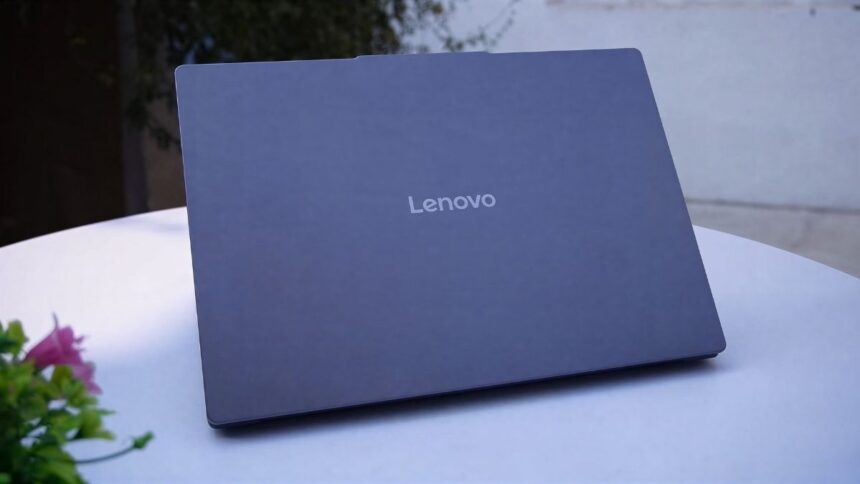
Lenovo has brought a big update to its IdeaPad series. Although we’ve already examined the previous Slim 3, the new model offers significant advancements in design, construction, performance, speakers, and even screens. Let’s examine what has changed, who this laptop is intended for, and which model is best for you.
Unboxing and first impressions
There’s not much new to say about the unboxing. The packaging is the same as before. Inside the box you’ll find:
- 65W round-pin charger
- Three-pin power cable
- Quick Start Manual & Guidebook
A USB Type-C charger is not provided, even though the laptop supports Type-C charging — which is a bit strange, as most brands are shifting to Type-C charging these days.
New design – minimalism on a whole new level
This is the biggest change.
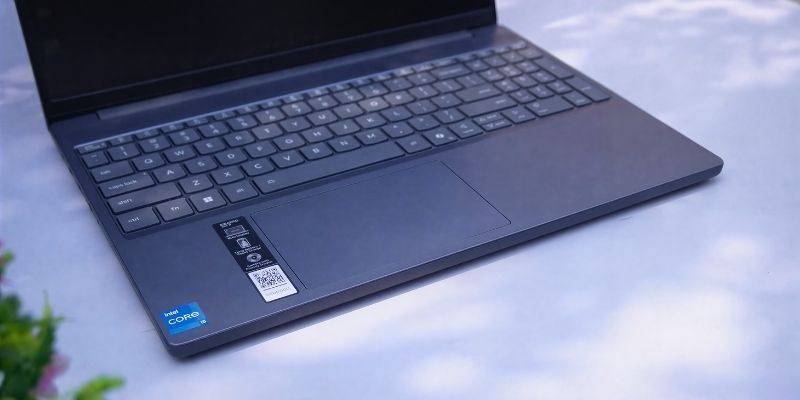
This time the design has a completely fresh and minimal look. The top cover is metal, giving it a premium feel when held in the hand. The bottom part is polycarbonate, but the grip and handling are very good. The weight is low, and the whole body is quite boxy — which gives it a MacBook-like feel when held in the hand.
- There is a long rubber grip at the bottom, making it stable on the table.
- The hinge can be opened up to almost 180°, which is useful for presentations or viewing.
- The hinge feels much stronger, not as loose as before.
- The bottom part lifts up slightly when opening with one hand — this could have been improved.
The quality of the keyboard and trackpad is also much improved:
- White backlight (2-level)
- Large trackpad, soft clicks, premium feel
- The typing feedback is awesome — ideal for long writing, coding.
Speakers and audio
This time the speakers are not on the bottom—directly on the grill above the keyboard.
There is Dolby Atmos support and the sound is crisper and clearer than before. The bass is not too much but there is no distortion. The mids and vocals sound very good.
Display
- 15.3-inch IPS Anti-Glare Panel
- 16:10 aspect ratio
- 300-nits brightness
- 45% NTSC color gamut
- 60Hz refresh rate
The 16:10 aspect ratio gives you more workspace — great for productivity. There are some black bars when watching videos, but the anti-glare coating reduces reflections.
However, the 60Hz refresh rate seems a bit outdated these days, as 90Hz/120Hz is now seen on many laptops.
Webcam and security
- 1080p webcam with privacy shutter
- Face Unlock with IR sensor
These features are really useful and weren’t in the previous version.
Specifications and upgradeability
Now for the real deal — configuration and upgrades:
| Feature | Details |
| Processor | Intel i5-13420H |
| RAM | 8GB DDR5 soldered + 1 slot (max 24GB) |
| Storage | 2× M.2 SSD slot (up to 2TB) |
| GPU | Intel UHD Graphics |
| Battery | 60Wh |
| YOU | Windows 11 + Lifetime MS Office 2024 |
There is dual-channel RAM support (which was not available in previous versions).
The SSD is also faster now — read/write speeds are much better than before.
Performance & Benchmark (Real-world experience)
Cinebench, PCMark and other benchmarks have slightly better scores than the previous Slim 3. The TDP is locked at 25W, which puts less pressure on low thermals despite being an H-series CPU.
Usage experience:
- Coding, programming, office and multitasking — absolutely smooth
- 1080p video editing — can be done quite well
- 4K editing, heavy rendering, 3D modeling — not recommended
- After Effects & Blender — Performance is limited
Casual Gaming
| Game | Setting | FPS |
| CS2 | Low | 50–60 FPS |
| GTA V | Normal (1200p) | ~60 FPS |
| Valuing | High | 150–160 FPS |
Ports
| Left side | Right side |
| Power port | USB-A 3.2 Gen 1 |
| USB-A 3.2 Gen 1 | Full-size SD Card slot |
| HDMI 1.4 | Power Button |
| USB-C 3.2 (PD + DP) | |
| 3.5mm combo jack |
Both charging and display output are possible with USB-C — a big plus point.
Battery
From a 60Wh battery in normal use:
- 6–7 hours of screen-on time available (in Balanced mode)
Battery life is quite good despite having an H-series CPU.
Price & Recommendation
The current price is around ₹56,000 (at the time of making the video). But if it drops to between ₹45,000–₹50,000 during the sale, then it can be considered the best value.
Ideal for whom
✔ Student / Office Worker / Programmer / Business Use
✔ Photo/video editors that work in 1080p
✔ Those who value minimal design and build quality
✔ Casual Gamer
Who should not buy
❌ For heavy 3D, CAD, VFX, AAA gaming
❌ Those who work in 4K editing
Final Verdict
The Lenovo IdeaPad Slim 3 (i5-13420H) feels truly premium this time around — there are big improvements in build, speakers, performance, upgradeability, all aspects. If you can get it under ₹50,000, you can close your eyes. The feel of the Slim 5 is now available in the Slim 3 and it’s a balanced, value-for-money package.